


docs/
Outline
---
title: Cutting a reel frame by frame with FFmpeg
slug: ghost-reel-ffmpeg
lang: en
published: 2026-10-31
words: 497
lines: 84
size: 3.2 KB
read: 3 min read
reel: The ghost photoshoot
---
Cutting a reel frame by frame with FFmpeg
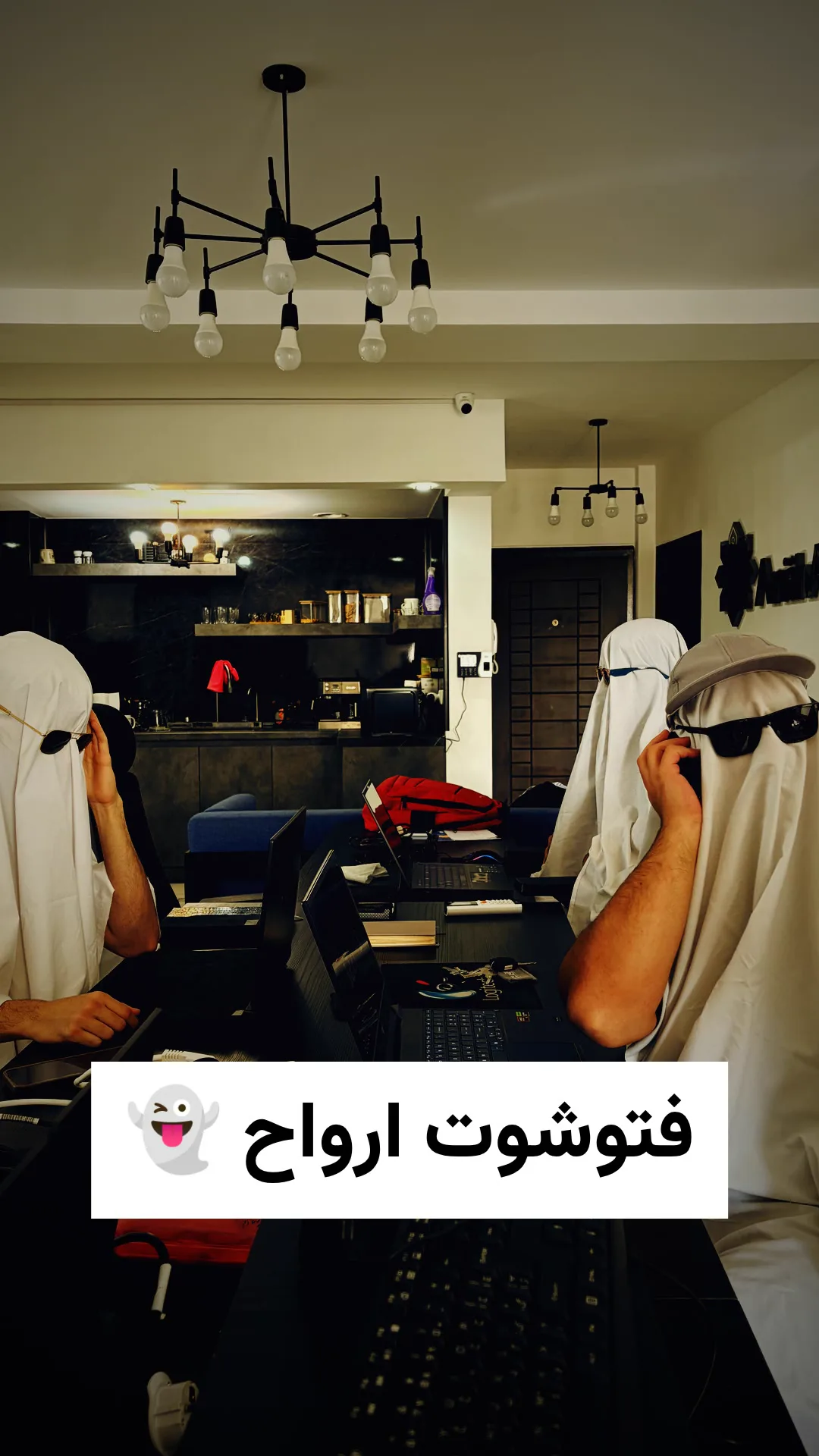
For Halloween we shot a ghost photoshoot at the office. The reel is 15 seconds long, and there is no editor project behind it. It is one bash script around FFmpeg. The goal was to use a reference reel's music untouched, with every cut on the same frame as the reference.
The target
1080x1920, 30 fps, 448 frames, 14.93 s
H.264 High, 14 Mbps, 2 pass, BT.709
AAC 44.1 kHz stereo, copied from the reference
-14.1 LUFS integrated
1. Read the cuts from the reference
ffmpeg -hide_banner -i ref.mp4 -vf "select='gt(scene,0.3)',showinfo" \
  -an -f null - 2>&1 | grep -o 'pts_time:[0-9.]*'
1.2 2.8 5.5667 6.6667 8.1 9.1 10.0667 11.1333 11.9 13.0333 14.0667
Those 11 cuts make 12 shots. Multiply by 30 for frames, and the counts must sum to 448:
36 48 83 33 43 30 29 32 23 34 31 26
2. Cut each shot to an exact frame count
Three video clips came first, then seven stills, one frame grabbed from video, and a final still, each held for its count. The iPhone clips are HDR, so they get tone mapped first:
HDR="zscale=t=linear:npl=203,tonemap=hable:desat=0,zscale=p=bt709:t=bt709:m=bt709:r=tv,format=yuv444p10le,"
FRAME="scale=1080:1920:force_original_aspect_ratio=increase:flags=lanczos,crop=1080:1920,setsar=1,fps=30,"

ffmpeg -ss 5.0 -i footage/IMG_0224.MOV -map 0:v:0 -an -frames:v 48 \
  -vf "setpts=PTS-STARTPTS,$HDR$FRAME$GRADE" \
  -c:v prores_ks -profile:v 4 seg02.mov
The master is ProRes 4444, so nothing gets compressed twice before the export.
3. The grade
The same chain runs on every shot, so stills and video match: more contrast, cooler shadows, warmer highlights, a vignette and a little grain.
GRADE="eq=contrast=1.18:brightness=-0.07:saturation=1.12:gamma=0.92,\
colorbalance=rs=-0.06:gs=-0.01:bs=0.10:rm=0.05:gm=0:bm=-0.04:rh=0.12:gh=0.04:bh=-0.10,\
curves=all='0/0.02 0.25/0.16 0.6/0.6 1/0.95',vignette=PI/4.5,noise=alls=6:allf=t"
4. Copy the music, do not encode it
ffmpeg -i master.mov -i ref.mp4 -map 0:v:0 -c:v libx264 -b:v 14M -pass 2 \
  -map 1:a:0 -c:a copy -movflags +faststart final.mp4
-c:a copy is the whole trick. The source is only 61 kbps AAC, and encoding it again would make it worse. A hash proves the audio is the same:
ffmpeg -i final.mp4 -map 0:a -c copy -f md5 -
ffmpeg -i ref.mp4 -map 0:a -c copy -f md5 -
MD5=83a5ab8a4bdbe164b11af5a516e95e44
MD5=83a5ab8a4bdbe164b11af5a516e95e44
What broke
One frame late. Clip 3 started at PTS 0.0333, not 0. That pushed cuts 4 to 11 one frame late and cost the last still its final frame. setpts=PTS-STARTPTS at the head of the chain fixed it.
The wrong color range. The RGBA title overlay moved the composite to full range, so the file was tagged yuvj420p. The final export forces limited range BT.709.
A cut that looks missing. Scene detection found 10 of the 11 cuts at 0.3. The last one joins two similar shots, so it scored lower. It fires at 0.05, and the frame difference confirms the cut is on the exact frame.
Why script it
The script is the edit. If a shot changes, I change one line and render again, and the same checks run every time: cut times, frame count, audio hash, loudness.
| For Halloween we shot a ghost photoshoot at the office. The reel is 15 seconds long, and there is no editor project behind it. It is one bash script around FFmpeg. The goal was to use a reference reel's music untouched, with every cut on the same frame as the reference. |
| ## The target |
| ```text |
| 1080x1920, 30 fps, 448 frames, 14.93 s |
| H.264 High, 14 Mbps, 2 pass, BT.709 |
| AAC 44.1 kHz stereo, copied from the reference |
| -14.1 LUFS integrated |
| ``` |
| ## 1. Read the cuts from the reference |
| ```bash |
| ffmpeg -hide_banner -i ref.mp4 -vf "select='gt(scene,0.3)',showinfo" \ |
| -an -f null - 2>&1 | grep -o 'pts_time:[0-9.]*' |
| ``` |
| ```text |
| 1.2 2.8 5.5667 6.6667 8.1 9.1 10.0667 11.1333 11.9 13.0333 14.0667 |
| ``` |
| Those 11 cuts make 12 shots. Multiply by 30 for frames, and the counts must sum to 448: |
| ```text |
| 36 48 83 33 43 30 29 32 23 34 31 26 |
| ``` |
| ## 2. Cut each shot to an exact frame count |
| Three video clips came first, then seven stills, one frame grabbed from video, and a final still, each held for its count. The iPhone clips are HDR, so they get tone mapped first: |
| ```bash |
| HDR="zscale=t=linear:npl=203,tonemap=hable:desat=0,zscale=p=bt709:t=bt709:m=bt709:r=tv,format=yuv444p10le," |
| FRAME="scale=1080:1920:force_original_aspect_ratio=increase:flags=lanczos,crop=1080:1920,setsar=1,fps=30," |
| ffmpeg -ss 5.0 -i footage/IMG_0224.MOV -map 0:v:0 -an -frames:v 48 \ |
| -vf "setpts=PTS-STARTPTS,$HDR$FRAME$GRADE" \ |
| -c:v prores_ks -profile:v 4 seg02.mov |
| ``` |
| The master is ProRes 4444, so nothing gets compressed twice before the export. |
| ## 3. The grade |
| The same chain runs on every shot, so stills and video match: more contrast, cooler shadows, warmer highlights, a vignette and a little grain. |
| ```bash |
| GRADE="eq=contrast=1.18:brightness=-0.07:saturation=1.12:gamma=0.92,\ |
| colorbalance=rs=-0.06:gs=-0.01:bs=0.10:rm=0.05:gm=0:bm=-0.04:rh=0.12:gh=0.04:bh=-0.10,\ |
| curves=all='0/0.02 0.25/0.16 0.6/0.6 1/0.95',vignette=PI/4.5,noise=alls=6:allf=t" |
| ``` |
| ## 4. Copy the music, do not encode it |
| ```bash |
| ffmpeg -i master.mov -i ref.mp4 -map 0:v:0 -c:v libx264 -b:v 14M -pass 2 \ |
| -map 1:a:0 -c:a copy -movflags +faststart final.mp4 |
| ``` |
| `-c:a copy` is the whole trick. The source is only 61 kbps AAC, and encoding it again would make it worse. A hash proves the audio is the same: |
| ```bash |
| ffmpeg -i final.mp4 -map 0:a -c copy -f md5 - |
| ffmpeg -i ref.mp4 -map 0:a -c copy -f md5 - |
| ``` |
| ```text |
| MD5=83a5ab8a4bdbe164b11af5a516e95e44 |
| MD5=83a5ab8a4bdbe164b11af5a516e95e44 |
| ``` |
| ## What broke |
| **One frame late.** Clip 3 started at PTS 0.0333, not 0. That pushed cuts 4 to 11 one frame late and cost the last still its final frame. `setpts=PTS-STARTPTS` at the head of the chain fixed it. |
| **The wrong color range.** The RGBA title overlay moved the composite to full range, so the file was tagged `yuvj420p`. The final export forces limited range BT.709. |
| **A cut that looks missing.** Scene detection found 10 of the 11 cuts at 0.3. The last one joins two similar shots, so it scored lower. It fires at 0.05, and the frame difference confirms the cut is on the exact frame. |
| ## Why script it |
| The script is the edit. If a shot changes, I change one line and render again, and the same checks run every time: cut times, frame count, audio hash, loudness. |